How to Create a Picture in Minecraft
A “picture in Minecraft” here means block-by-block pixel art built into a wall — not the vanilla Painting item you craft and hang with a right-click. If you wanted that instead, look up the painting recipe; this guide is about the block version.
You can absolutely design a block picture by eye, but for anything based on a real image the fast path is to let a converter do the color matching and use your time for the building. This guide covers both the planning and the placing.
Plan the picture before placing a single block
Decide three things up front: where (a flat wall facing the direction players approach from), how big (64 blocks wide for simple art, 128+ for photos), and which blocks. Wool, concrete and terracotta carry most of the color range; concrete gives the cleanest, most saturated pixels. Run your source image through the picture-to-Minecraft converter to get an exact block map and a material list instead of guessing colors.
Gather materials with the list, not by feel
A 128×128 picture is 16,384 blocks — underestimating one wool color by a few stacks means another trip to the sheep farm mid-build. The converter’s material list counts every block in stacks of 64, so shopping is one pass. In survival, enable the survival-obtainable filter so the plan never calls for blocks you cannot farm.
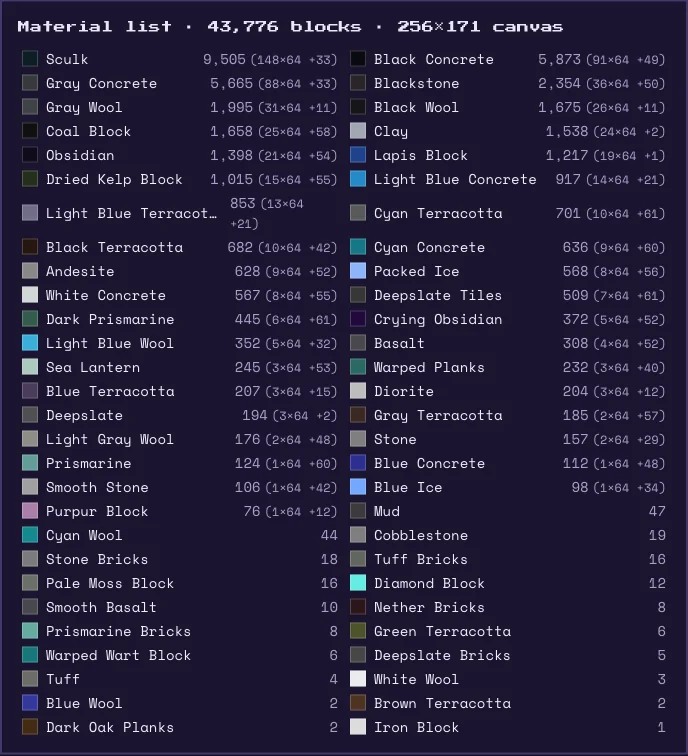
Build layer by layer, bottom up
- Work one horizontal row at a time from the bottom — you can stand on the previous row.
- Keep the reference PNG open on a second screen, and mark finished rows to avoid losing your place.
- Every 10–15 rows, walk back to where players will actually view the picture and check it — colors read differently at distance.
- With the Litematica mod you can skip the counting entirely: load the exported .litematic and place blocks over the ghost preview.
Creative mode shortcut
On your own world or creative server, export a .schem file and paste it with WorldEdit — the entire picture appears in one command, and you can spend the saved hours on the landscaping around it.
FAQ
- How to create a picture in Minecraft?
- Convert your source image to a block plan with a picture-to-Minecraft tool, gather the blocks from the generated material list, then build the wall row by row from the PNG — or paste it instantly with a WorldEdit schematic.
- What blocks are best for pictures in Minecraft?
- Concrete for clean saturated colors, wool for easy survival farming, and terracotta for skin tones and muted shades. A converter picks the closest block per pixel automatically from the palette you allow.
- How many blocks does a Minecraft picture need?
- Width × height. A 64×64 picture is 4,096 blocks; 128×128 is 16,384. The material list breaks that down per block type in stacks of 64 before you start.
- Is this the same as a Minecraft painting?
- No — the vanilla Painting item is a single decorative frame you craft from sticks and wool, showing one of a fixed set of pieces of art. A block picture is pixel art you design yourself, built out of many blocks across a wall.